


Making Useful Structured Commits That Become Changelogs
Overview
git-com is a tool that makes it easy to create structured commit messages. It exists because of two roles I’ve played at work:
- release manager
- Leading a support engineering team tasked with putting out production fires.
Both of these jobs involved investigating what actually ended up in a release. With the support engineering role I needed to find out what got added that might have broken a thing. With the release manager role I needed to find out what actually got added as compared to what was promised, or never mentioned. Then, I needed to create a document to convey those changes.
Having a readable structured commit history would have been huge for me back then. Now that I do have one it’s proving invaluable.
This post discusses how to think about creating and utilizing structured commits in a way that will help you accomplish two goals:
- finding specific changes in your history
- conveying what changed to others via generated changelogs
None of this requires git-com, but using it will definitely facilitate the process, and it’s written from the perspective of someone using it.
What Should Be In Your Commit?
git-com is intentionally not opinionated about this. What is “useful” or “good” varies wildly from project to project.
The one guiding thing I can say with a lot of confidence is that you should never add structured data to your git commit messages that you don’t need. Leave off the “nice to have” items. Every “unnecessary” step you make someone take (even you) when creating a git commit is another tiny piece of built up resentment.
Titles
Getting the title “right” is the most important thing. There are many cases where the title is the only thing you’re going to see until you dig in for more info. Thus the title needs to convey the most critical information in order for you to know if you want to get more info. The title is frequently the only thing that gets written in a commit, and they’ll show up in your changelog, or become the starting point for what shows up.
There is, however a significant limitation on git titles: They should be ≤ 72 characters. Ideally they should be around 50.1 That makes for a tricky balance.
Additionally, you need to think about what will be useful to the tooling that will take the commit messages and convert them into a changelog.
I’ve addressed these problems in two ways.
Start with structure
All my git-com generated commit messages start with [<change type>]. This serves two purposes.
- The square brackets draw your visual attention. They say “hey this is most critical bit of this line”
- It’s not something I’ll bother with when making a quickie “corrected spelling errors” type commit, and thus it becomes easy to distinguish “stuff worth conveying to others” from “one of the many little changes that got made but aren’t worth talking about”
Because the contents of those square brackets come from a limited set of choices defined in my .git-com.yaml file, it also serves as a way for my changelog generator to easily distinguish between a changelog worthy commit and something that just happens to start with square brackets. This also means that you can have commits in your git log that, by virtue of having no structure don’t end up in the changelog.
Personally I use git commit -m "corrected spelling errors" for things not worth conveying, but if you want to build the habit of always using git-com you have two options.
- use a specific change type that will be visible in your commits but excluded later. E.g.
[meh] - make the change type option “skippable”. The skip option appears first so you can just whack the enter key if you don’t care about choosing something from the list.
    allow-empty: true
    empty-selection-text: Skip
Neither of these is “better”. I like the idea of having trivial commits start with [meh] It sounds entertaining. On the other hand, I can see the argument that you’d want to draw as little attention as possible to commits that aren’t noteworthy. That way humans scanning git log output don’t have their eyes drawn to unimportant things.
I’m firmly of the belief that the type of change is the most important thing to have in a commits title in order to help anyone who needs to look through the log to find something specific.
I also believe that change type is an excellent way of breaking down changelogs of software products. I don’t want features, fixes, and tweaks to all be mixed together in a jumble of a list. Sometimes I want to know what cool features a project has added. Sometimes I just want to know if they fixed a specific bug.
Keep it concise
Not because of the character limit, but as a way of being nice to future humans. The freeform portion of the title should contain only enough information for a reader to know if it’s worth their attention.
Ex. “full-text search refinements” not “reworked our use of faceted search to prioritize items we sell”
Additional details like that can be added to the commit body. Just give me enough information to be able to determine if this commit is the one I care about or need more details on.
Different Text for Different Audiences
Git logs and changelogs are things generated for different audiences. Git logs are for geeks looking into the details of a codebase. Changelogs are for people who use your tool, or maybe for stakeholders within your company who have been involved in guiding the tool. They have different needs.
Because of this, it’s important to keep in mind that the text that appears in your git logs isn’t necessarily the text you want to show in your changelogs. With regards to the structured text this is easily handled with aliases, and leads to some interesting possibilities.
Git wants short titles, so find short ways to represent things like change type in actual commits. “feature” is a lot longer than “add” or “feat”, and you don’t really need to indicate that “feat” is an abbreviation by adding a period (“feat.”).
Personally I’ve settled on
- add
- fix
- clean-up
- refactor
You’ll note that the last two could be shorter. I want them to be shorter, but “cleanup” annoys me, and “clean” feels wrong. I also haven’t thought of a shorter way to say “refactor”. What you end up will be the result of a highly subjective balancing act.
However, as I noted before, the thing in your git commit message doesn’t have to be identical to what’s displayed in the changelog. So you can put short things in the commit message that end up as longer things in the final communication. You can also put in things that will be excluded. Like fixes to a security issue no-one noticed yet.
My changelog generation tool reads in my .git-com.yaml file and leverages the fact that it supports the concept of “meta elements”. These are elements that exist within the config but aren’t for consideration as part of your commit message.
meta_element_changelog:
    display_aliases:
        fix: "fixed"
        add: "added"
        refactor: "refactored"
        clean-up: "cleaned"
When building the changelog it finds commits with [add] and groups them under an added heading because of the mapping in display_aliases, but this could be anything. Maybe “add” commits end up under “❇️ New Features”, or the other way around. Maybe ❇️ in a commit title indicates new coolness and gets grouped under “added”. Keep in mind that users of git-com are usually choosing from a pick list, so you don’t have to know how to type special characters like ❇️ to have them added in the commit message.
-
Other Representations
Note: square brackets aren’t the “right” solution here. They’re just a solution. Here’s some other ways you might handle the same thing. What’s important is that you find a way to represent things that you and your team (if working with others) can agree makes sense and isn’t annoying.
# <optional breaking change> <change type> <separator> <freeform text>
⚠️ (feature) → full text search
# nonbreaking version…
(feature) → lists recently completed items

# Minimal Emojis
# <indicator structure> <change type> <separator> <freeform text>
# ℹ️                    (fix, add, etc.) :           blah blah
ℹ️ fix: now supports linked worktree directories

# FULL EMOJIFICATION 🤪
# <indicator structure> <change type> <separator> <freeform text>
# ℹ️                    (❎, ❇️, ♻️ etc.) ▶️       blah blah
ℹ️❎▶️   now supports linked worktree directories

# maybe add special emoji to indicate a breaking change
# <indicator structure> <change type><optional breaking change><separator> <freeform text>
ℹ️❇️⚠️▶️ full text search
# Breaking because it might require a db upgrade or something noted in the commit body
Body
Here’s where things get extremely subjective.
Obviously you need block of freeform text for people to (optionally) describe what the commit is about, but the question of what - if any - structured data you should include is where things get complicated.
I’ve chosen to go with a multi-select for portions of the codebase that are involved in the change. The list of options for this is very different for each project I use git-com in, but what they have in common is that each item represents a significant distinct part of the codebase, and it’s mostly sorted so that the frequent items are near the top.
This data never shows up in changelogs, and I rarely ever read it. I do this because of my time spent hunting down production bugs at work.
For example, let’s say the look of our site had become borked. I’d have a pretty good guess it was changes related to the “css” portion of our codebase or maybe something in the “ui” layer. It would have been invaluable to me to be able to run a command like this and find commits since the last release that included changes to the relevant sections of the codebase.
git log v1.2.0..HEAD --grep " (css|ui)" --extended-regexp
Here’s what I see when I run that in a codebase that uses those two keywords in its “Code Sections” (see example below)
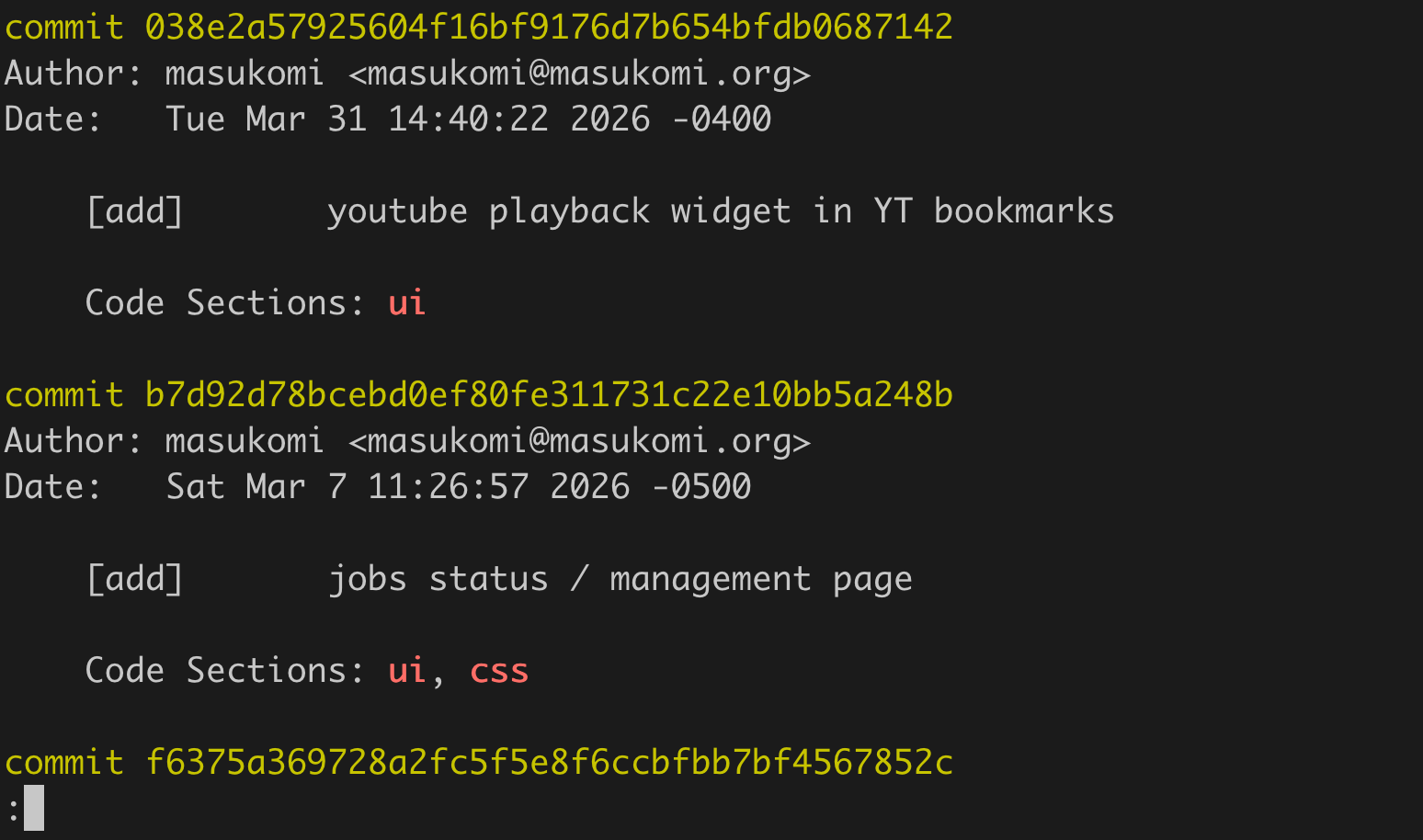
Commits since a release in matching sections of the codebase.
If a search like that overlapped with too much of the freeform text I could limit the results to the “Code Sections” metadata line by doing this.
git log v1.2.0..HEAD --grep "Code Sections:.*(css|ui)" --extended-regexp
I experimented with Tags and “Code Sections” it ended up feeling like unnecessary paperwork that I was resenting. Again, my advice is to only add sections that you have real use for.
Example Config
The list below is from the BackupBrain webapp which is currently focused on managing, and archiving bookmarks.
code-sections:
    type: multi-select
    allow-empty: true
    modifiable: true
    record-as: joined-string
    before-string: "\nCode Sections: "
    destination: body
    instructions: Which section(s) of the codebase?
    options:
        - bookmarks
        - archives
        - ui
        - ux
        - css
        - config
        - meta
        - tests
        - migrations
        - infrastructure
        - tags
        - oauth
Changelogs
I have plans for creating a Changelog generator that can read in a project’s .git-com.yaml and extrapolate the rules it needs to read and format a changelog. Until then though, you’ll have to approach this problem on your own. The changelog tool I’m currently using is called git-com-changelog and can be found here.
The goal
Creating changelogs from commit messages has been the most useful and meaningful thing I’ve done with git-com. It doesn’t just give me good changelogs. It’s also wired into my release tooling so that:
- new version tags include the changelog in their body
- my CHANGELOG file gets the latest info prepended to the top with markdown or org-mode formatting depending on the file-type.
- my Github Releases inherit the changelog text from the tag to populate their bodies.
For some of my tools, cutting a new release means typing release v1.2.3 and that’s it. Changelogs get updated when needed, tags get cut when needed, releases are created with changelogs in their body, artifacts get built and attached to the release, homebrew formulas get updated and pushed.
Changelog example:
v1.7.0

[fixed]
- hitting ESC at a confirmation now exits
- tweaked how lefthook's go-tester works
- commits work in linked worktrees
- maintains yaml element ordering when adding an option

[added]
- final validation now leads to edit if NO is chosen
- added some lefthook files
- now supports include-empty attribute
- stores commit message for reuse when pre-commit hooks fail
- stores & offers up commit messages from failed commits

[refactored]
- faster startup
- hook output now streams live

[cleaned]
- backporting some notes from web site
- removed instructions.org
Making it Happen
Getting from commits raw commits to useful changelogs is surprisingly easy. There are three aspects to the processing.
- read
.git-com.yamlto figure out what goes into a prompt - optionally read the contents of the
meta_element_changelogsection to get processing rules & modifiers. - gather commits, filter, group (optionally) and output.
1. Figure out what to look for
-
Limiting your input
You don’t want to reprocess your entire git history every time. So, I recommend that your changelog tool can take standard parameters for limiting the commits it has to work through. I’ve chosen to go with a
--fromand an optional--toparameter. My tool just passes those limiting bounds on togit logwhen asking for commits to process. This is especially useful when you start building automated changelogs into your build process.# everything between the v1.5.0 tag and the v1.7.0 tag git com-changelog -f v1.5.0 -t v1.7.0 # everything from v1.5.0 git com-changelog -f v1.5.0
-
Knowing what ’s worth considering
The first step is knowing what structured data you can always count on existing in a commit worth including. In my case it’s a commit message whose title starts with a change-type indicator
[foo]where “foo” is any of the currently supported change type options.So, for me that means reading in the project’s
.git-com.yml, and asking for the contents of thechange-typeelement’soptions.change-type: destination: title type: select modifiable: true instructions: What kind of change? before-string: '[' after-string: ']' format: "%-12s" options: - fix - add - refactor - clean-up
2. Apply modifiers
Note: This is completely custom, but I think it’s an idea worth copying.
git-com supports the inclusion of custom YAML in its config file as long as the top level element begins with meta_element_ I’ve been using meta_element_changelog to store project specific configuration / behavioral instructions for my changelog generator.
None of the following is built into git-com, but my changelog generation is based on the git-com configuration at the time of invocation, so it makes sense to store it all together. You can make your own meta_element_foo with whatever information you find useful for helping generate a great changelog.
I have 4 types of assorted modifiers.
-
display_aliasesThese provide a display alias for the heading each type of commit will be grouped under. For example you can see that any commit with a change-type of “add” will be displayed under a heading of “added”, but it could be something fancier like “❇️ New Features”
meta_element_changelog:
    display_aliases:
        fix: "fixed"
        add: "added"
        refactor: "refactored"
        clean-up: "cleaned"
-
retired_aliasesBecause ideas and conventions change over time,
clean-upmay get replaced with something likeclean. This happened a lot as I was getting started withgit-comand figuring out what worked, and didn’t work for me.As a result, I’ve added in support for
retired_aliases. So, ifclean-upchanged tocleanthen I’d change mymeta_element_changelogsection like this.meta_element_changelog: retired_aliases: clean-up: "clean" display_aliases: fix: "fixed" add: "added" refactor: "refactored" clean: "cleaned"Note that under
display_aliasesclean-uphas been replaced with the new term which would have been added to the options ofchange_typeat the top of the config. The newretired_aliasessection tells the code that if it finds a line withclean-upas the change type it should replace it withcleanand then process as if it wascleanall along.
-
“permissive” mode
My changelog tool has a “permissive” mode that can be toggled with a command line argument. It basically means “hey, if find a change type that isn’t in the list, just consider it valid.” It’s good for testing but I don’t recommend it in practice.
-
exclusionsWhile I don’t use it, I’ve added support for an optional “exclusions” list. After applying any
retired_aliasesit checks if the current change-type is in the exclusions list and skips it if it is.meta_element_changelog: display_aliases: fix: "fixed" add: "added" refactor: "refactored" clean-up: "cleaned" exclusions: - security - mehGiven the list above, and commit with a change-type of “security” or “meh” would be excluded from the changelog.
3. Generate Output
Most of you will be generating markdown flavored files, but if you want to use this with git tag, you need a way to generate useful output with no markdown headings. The problem is that any line that starts with # is considered a comment by git, and is completely ignored. This means all your markdown headings will be stripped.
I’ve solved this by having it generate output without markup by default (like in the example above). It also supports --markdown and --org flags. Most of you won’t need the org one.
Because I like grouping similar changes (again, see the example) I create a “hash” / “dictionary” with keys for each encountered change-type, then build up a list of all the commit titles as its value (after stripping off the change type).
Then I just iterate over the collection. I use any display_aliases I found to change the heading text. For example changing “fix” to “fixed”, or “add” to “added”. For each line I apply the appropriate markup if the user requested it. That’s about it.
Consistency Consistency Consistency
The more projects you work on the more critical it becomes to have a consistent structure to your commit titles across projects. I can leverage my changelog generator across all of my projects because they’re always the same.
[<change_type>]<space><freeform_text>
For example:
[fix]     commits work in linked worktrees
If I start using a different structure in one of my projects I’ll have to create a new changelog generator or make modifications to the existing one specifically to accommodate the second format.
Summary
- Make commit titles include a small piece of consistent structured text that’s easy for humans and code to pick out. Having this be the change-type of the commit is a great place to start.
- Don’t gather data you don’t need.
Ignore temptation to add steps to your
git-comconfig that make future you and collaborators enter / choose info that isn’t really needed. You’ll just get annoyed. - The more important it is for you to fix bugs quickly, the more important it becomes to leave yourself hints in the commit body that’ll help you track down problematic changes quickly
- Creating a changelog generator is relatively easy, but you need something that understands the format that you’ve come up with for your commits.
Bonus
Using git-com’s format functionality makes it much easier to quickly skim changes because everything’s aligned.
❯ git log --oneline v1.6.0..v1.7.0
3382062 (HEAD -> main, tag: v1.7.0) changelog.org → CHANGELOG.org
8ddaa76 (origin/main, origin/HEAD) added a commented out lefthook pre-commit that'll always fail
23d3f40 [add]       stores & offers up commit messages from failed commits
2324d4e [add]       stores commit message for reuse when pre-commit hooks fail
1203fdd [refactor]  hook output now streams live
0a1ad2c [fix]       maintains yaml element ordering when adding an option
7489d58 [fix]       commits work in linked worktrees
3611a23 [refactor]  faster startup
906284d [fix]       tweaked how lefthook's go-tester works
0f01ecc [add]       added tag & release handling to homebrew tap script
5010937 [add]       added changelog.org file
-
Martijn Hols has a really nice blog post about How to write a good commit message. ↩︎