


Sharing a public Git repo over HTTP [flow chart]
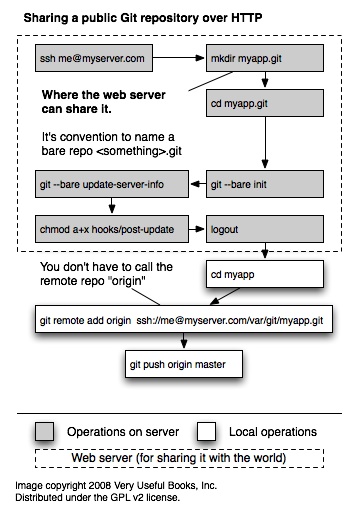
There is also an SVG version of this flow, which is more readable (but poor IE folks will have issues). Notes: This is a simplest possible configuration. Be sure to check out the docs for git-remote to see how to, optionally, designate specific local or remote branches. Many of the initial commands could be performed locally and then just uploaded to the server. This particular sequence guarantees that all the connection pieces are in place and working correctly.

There is also an SVG version of this flow, which is more readable (but poor IE folks will have issues). Notes: This is a simplest possible configuration. Be sure to check out the docs for git-remote to see how to, optionally, designate specific local or remote branches. Many of the initial commands could be performed locally and then just uploaded to the server. This particular sequence guarantees that all the connection pieces are in place and working correctly.
Much thanks to Tim Toolman for getting this info into two easy to follow posts: Sharing git repositories via OS X’s built-in web sharing and Setting up a new remote git repository.
However, this doesn’t feel elegant to me. If anyone can come up with a simpler / more elegant way to do this please add a comment.