


Importing an existing codebase into Git (a flowchart)
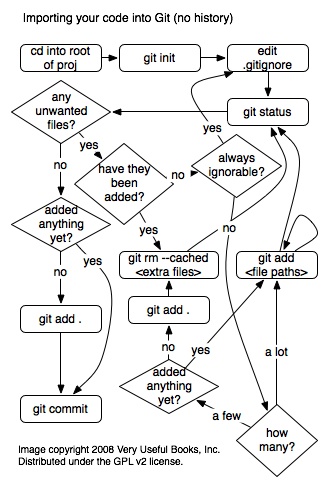
A simple flow chart showing the steps you should take to add an existing codebase to Git. This assumes you don’t have revision history that you wish to migrate from another version control system. Some notes about the flow:
- When adding file paths you can use wildcards like “git add /path/to/images/*.jpg”
- This is one of the few times when you’d want to use “git rm –cached " to un-add a changes in the index. After the first commit the recommended way to un-add changes to the index (staging area) is to “git reset HEAD “.
- Note that the only file that is edited during this process is .gitignore When you call “git add” you are adding the current content of a file to Git to the index. If you change a file after you add it Git won’t commit the additional changes (unless you add them too). So, it’s a good idea to run “git add .gitignore” just before you commit in order to make sure Git has the most recent version of it.
- You’d only, obviously, “add” files you wanted. “git add .” (note the dot) tells Git to add everything in, and below, the current directory.
This image is copyright 2008 Very Useful Books, Inc. and distributed under the GPL v2. It was created With OmniGraffle 4. If anyone wants the original, just holler.
 for a while now, and was excited when my manager offered to send me to
his one day course, and am quite grateful to have had the opportunity to
go. So, I definitely went into this with good expectations.
for a while now, and was excited when my manager offered to send me to
his one day course, and am quite grateful to have had the opportunity to
go. So, I definitely went into this with good expectations.